How it works · Private-preview walkthrough
From session to lesson.
Step 01
Choose your recording
In this private-preview walkthrough, the example starts with an existing recording up to 10 MB. Choose a short clip you have permission to share.
Sample file
Coding session
One failed test.
What changed?
Step 02
Read what will be shared
Review the data disclosure before analysis. If the recording includes confidential material or someone who hasn’t agreed to its use, stop and choose another file.
Before analysis
Read the disclosure.
Check the clip.
Ready to share?
Step 03
See the example analysis
In the private preview, Jimmy used speech and screenshots to draft a journal entry after consent. Built-in AI analysis is unavailable in the public pilot.
Example journal
Login test failed.
401 on screen.
No passing result shown.
Step 04
Check an answer
Ask about the analyzed session and open the supporting screenshot or quoted passage. If the evidence doesn’t answer your question, don’t treat the draft as proof.
Evidence check
Which test failed?
Open the screenshot.
Read the error.
Inside the private preview
One rule. Two kinds of evidence.
The rule was to wait for a five-minute candle to close. In this example, the review leaves the check at “Unsure.” You can inspect the recording instead of treating that uncertainty as a mistake.
Look for the screenshot at 00:15 and the quote at 00:18 in the desktop view. On mobile, the Evidence button keeps that moment within reach.
Try the scripted review below →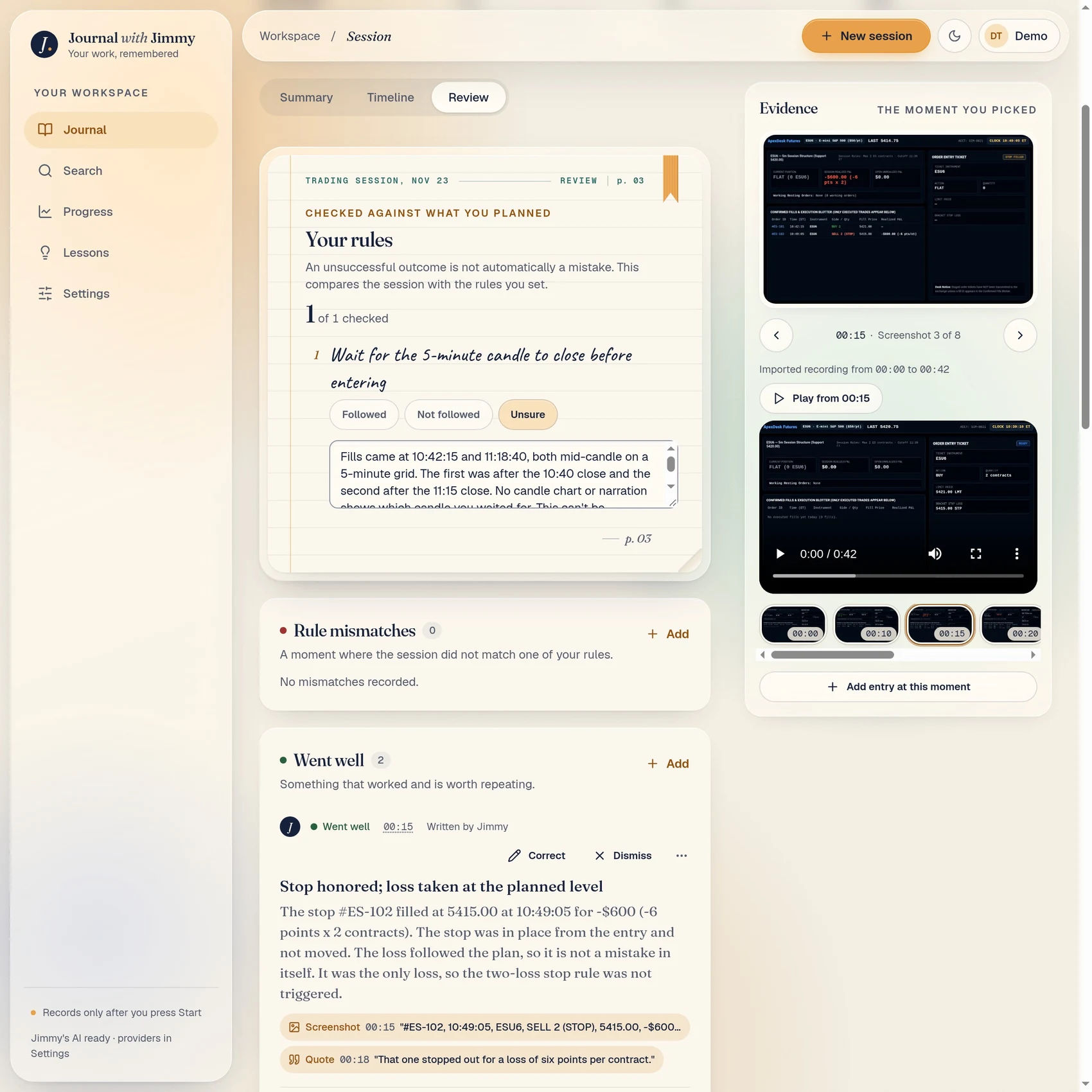
Scripted website demo
Ask about your session. Jimmy shows the evidence.
Pick a sample session or type a question. The pre-written replies show what a recording can establish, what it cannot verify, and what you might try next.
Journaling with Jimmy · Session review